tinyGS
· g4lile0 · tutorial · 2 min read
How to Join the Network: Getting Your TinyGS Account
A simple guide to registering your TinyGS account and becoming a Tiner using email invitations or Telegram.
Welcome to the community! To start tracking satellites and register your own ground station, you first need to create a TinyGS account.
Historically, joining the network required a Telegram account. However, since our 2025 Christmas release, you can now register completely via email without ever needing Telegram!
Below are the two available methods to claim your spot in the network. Choose the one that works best for you.
📧 Option 1: Email Invitation (No Telegram Required)
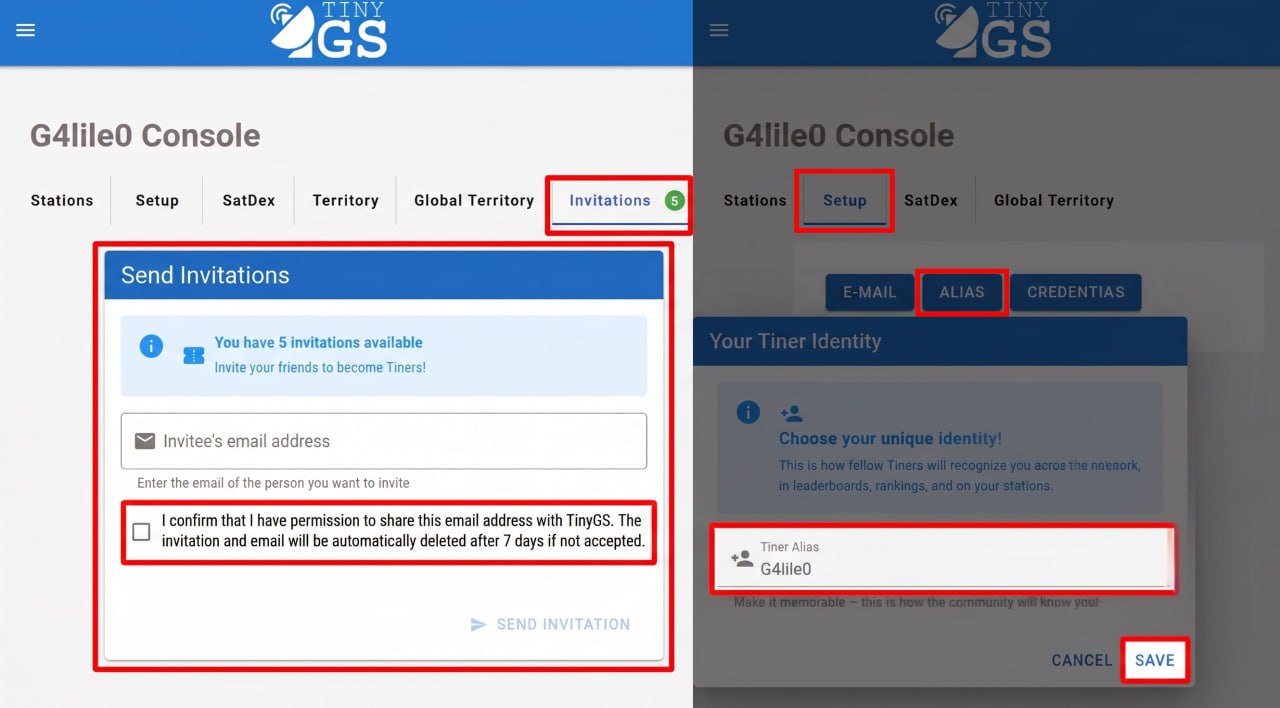
If you don’t use Telegram, or simply prefer to keep things in your mailbox, any friend who is already an active member of the TinyGS network can invite you directly from their personal console.
How to get an Email Invite:
- Ask a friend: Reach out to any active Tiner in the community.
- Give them your email: Provide them with the email address you want to use for your TinyGS console.
- Check your inbox: Once they send the invite, you will receive a secure registration link.
💡 Important Note for Current Members Sending Invites:
Before sending an email invitation to a friend, please set up your Tiner Alias first in your console’s Setup menu. If you don’t set an alias, your friend might not recognize who the invitation email is coming from! Always ask your friends for permission before sharing their email address with the platform.
🎓 Workshops & Educational Use
Are you planning a school project, university lab, or a local radio amateur workshop? Don’t worry about invitation limits! Drop us a line at invitations@tinygs.com, and our admin team will happily provide extra invitations to support your educational activities.
💬 Option 2: Registration via Telegram
If you are already part of our chat groups or prefer using chat bots, you can instantly register your account using our official Telegram automated assistant.
Step-by-Step Registration:
- Join our global community in the official TinyGS Telegram Group.
- Open a direct private chat with our assistant: @tinygs_personal_bot.
- Send the following commands to the bot depending on what you need:
/weblogin— Use this command to access the web interface and easily register or link your email address./mqtt— Use this command to instantly request your unique MQTT credentials (required for your stations to communicate with the network).
Next Steps 🛠️
Now that your account is ready and you know how to log into your console, it is time to check what components you need to build your physical station! Head over to the next tutorial: Gathering Your Equipment: The tinyGS Ground Station BOM.